
Agent‑Ready Architecture: The Capability Bus Pattern
David Ash · github.com/dash- · February 2026
Executive Summary
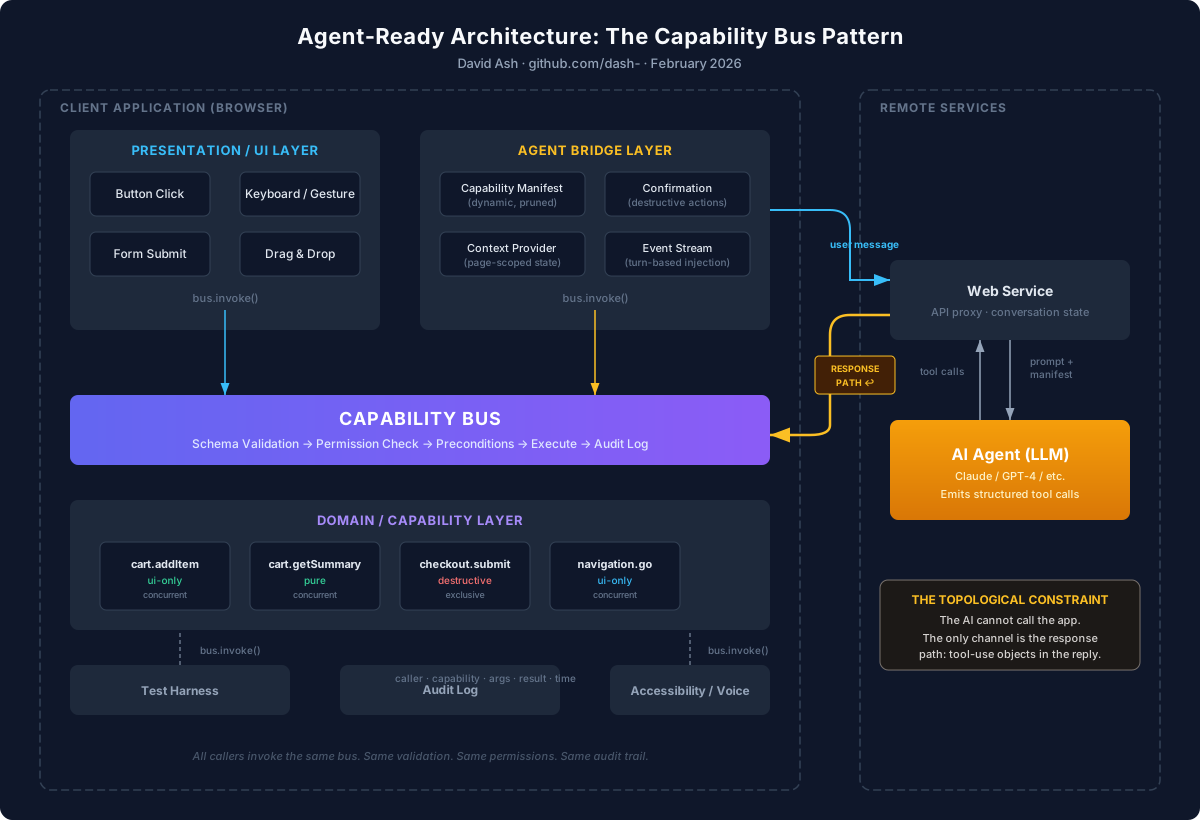
In a client‑side application — a single‑page app running in a browser — the AI agent cannot call the application. The application can make outbound requests to an LLM API, but nothing can call back into it. The only way an AI agent can act in the application is through the response path: structured tool‑use objects that come back in the LLM's reply, which the application then executes locally. The application is the orchestrator, not the AI.
This topological constraint is the starting point for this paper. Existing patterns for AI tool integration — such as Anthropic's Model Context Protocol — assume the application can expose a server that the AI connects to. When the application is a client‑side SPA, that assumption does not hold. This paper addresses the gap: how does an application that cannot be called give an AI agent the ability to act?
The answer is a Capability Bus that mediates all meaningful application actions, and an Agent Interface that exposes those actions to the AI through a structured, permissioned protocol. The bus is the application's own internal dispatch layer — buttons, keyboard shortcuts, and gestures all invoke capabilities through it. The agent becomes one more caller into the same surface, subject to the same validation, permissions, and audit logging. From the bus's perspective, a button click and an agent invocation are the same thing.
Communication between the agent and the application happens through a Structured Agent Invocation Protocol (hereafter "the invocation protocol"): a deterministic, typed contract for requesting and receiving the results of application actions. Agent commands are structured objects with explicit capability names, validated arguments, request IDs, and idempotency keys — not natural language embedded in chat text or escape sequences parsed from markdown.
The architecture synthesizes established patterns — command buses, centralized dispatch, tool‑calling LLM interfaces — but the specific composition around the client‑side topology constraint, and the protocol designed for it, have not been formalized before. The result is a system where a user can say "submit my order" into a chat panel, and the application performs exactly the same operation that would occur if the user had clicked the Submit button. No selectors. No screen scraping. No external service calls. The application remains the sole authority on what it can do and who is allowed to do it.
Problem Statement
The Topological Constraint
When a product team wants to add an AI chat panel to a client‑side application — a React SPA, a Vue app, a mobile webview — they face a fundamental constraint that is easy to overlook. The application runs in the user's browser. It can make outbound requests to a web service, and through that service to an LLM API, but the application itself is not addressable. The AI cannot initiate a connection to it. The only channel the AI has to act in the application is the response path: tool‑use objects embedded in the LLM's reply, which travel back through the web service to the client, where the application must interpret and execute them locally.
This is a different topology from the one that existing AI tool integration patterns assume. MCP, external tool servers, and function‑calling APIs all presume that the tool provider is a server the AI can reach. In a client‑side application, there is no server to reach — at least not one that has access to the application's UI state, local data, and in‑page business logic. The application must define an internal action surface and make it available to the AI through the only channel that exists: the response path.
This constraint alone is solvable — an application could simply parse tool calls from the LLM response and wire them to handlers. But doing this naively runs into three problems that make ad hoc approaches fragile, insecure, and unmaintainable.
Action Fragmentation
Business logic in a typical single‑page application is scattered across click handlers, keyboard shortcuts, effects, form submissions, and implicit UI flows. A React application might implement "add item to cart" as an onClick callback in one component, a keyboard shortcut handler in another, and a drag‑and‑drop handler in a third—each with subtly different validation logic, error handling, and side effects. There is no single authoritative representation of "what this application can do." If the AI's tool calls are wired to individual handlers ad hoc, the agent inherits all of this fragmentation — different code paths, different validation, different behavior depending on which handler it happens to call.
AI as Narrator, Not Actor
Most AI assistants embedded in applications are limited to describing UI features rather than invoking them. An AI copilot in a project management tool might say "click the gear icon in the top right, then select 'Integrations' from the dropdown," forcing the user to manually translate intent into gestures. This is especially harmful for accessibility: users who need AI assistance the most are precisely those for whom "click the third button" is the hardest instruction to follow. The AI knows what the user wants. The application knows how to do it. But without a structured action surface, there is no bridge between them.
Brittle Automation
When AI systems do attempt to act on behalf of users, they typically resort to UI automation—clicking buttons by selector, filling form fields by DOM path, waiting for elements to appear. This approach is fragile by nature. A CSS refactor breaks the selectors. A layout change moves the target. A loading state introduces a race condition. Every consumer of the UI—tests, macros, accessibility tools, AI agents—independently rediscovers and re‑encodes the same fragile assumptions about the interface.
The Missing Abstraction
These problems share a common root: the absence of a stable, semantic, application‑level action surface. The application has no unified concept of "the things I can do" that is independent of how those things are presented in the UI. Introducing this abstraction solves the topology problem — giving the AI a structured surface to act through — while simultaneously resolving the fragmentation, narration, and brittleness problems that existed before AI entered the picture.
Prior Art and Related Work
This proposal builds on several established patterns and distinguishes itself from adjacent approaches.
The Command Pattern and Command Buses
The idea of encapsulating operations as first‑class objects is well established. The Gang of Four Command pattern (1994) introduced the concept of reifying actions so they can be queued, undone, and logged. CQRS (Command Query Responsibility Segregation) further separates the write path from the read path, routing all mutations through explicit command objects. The Capability Bus proposed here is a direct descendant of these ideas, extended with agent‑oriented metadata such as natural‑language descriptions, input schemas for LLM tool use, and side‑effect classifications.
Capability‑Based Security
In the security literature, a "capability" has a specific technical meaning: an unforgeable, attenuable token that grants its holder access to a specific resource or operation. This paper does not implement capability-based security. The term "capability" is used here in its common English sense: a named, self-describing action that the application can perform. Permissions in this architecture are enforced through conventional role- and scope-based checks at the bus layer—not through unforgeable tokens or capability attenuation.
The security concept is worth acknowledging because it addresses a related concern: ensuring that authority to perform an action is explicit rather than ambient. This architecture shares that goal in spirit but achieves it through centralized permission enforcement, not through the formal mechanisms of a capability-secure system. Readers familiar with capability-based security should not assume properties such as unforgeability, transfer semantics, or attenuation that this architecture does not provide.
Model Context Protocol (MCP)
Anthropic's Model Context Protocol provides a standardized way for AI agents to discover and invoke tools exposed by external servers. MCP solves the topology where the tool provider is a server that the AI can connect to over a transport layer — a database, a SaaS API, a local file system exposed through a server process.
This paper addresses a different topology: one where the application is a client that cannot be called. In a browser‑based SPA, there is no server endpoint for the AI to connect to, and the application's UI state, local data, and in‑page business logic are not accessible from outside the browser. The Capability Bus is not an external service built for the agent; it is the application's own internal dispatch layer, and the agent acts through the response path — tool‑use objects in the LLM's reply that the application executes locally against its own bus.
The distinction is architectural, not competitive. MCP is "build an external tool server for the agent." The Capability Bus is "refactor your application's internal architecture so that the agent gets access as a side effect." The latter is a much easier sell to teams that are not yet committed to AI integration, because the bus improves the application's architecture — thinner components, unified audit logging, testable business logic — regardless of whether an agent is ever connected.
The two approaches are complementary. An application with a well‑defined Capability Bus could also expose its capabilities as an MCP server for external agents, using the same capability definitions. And a full‑stack application might use MCP for server‑side tool integration while using the Capability Bus for client‑side actions, composing both manifests into a unified surface for the agent.
Client‑Side State Management: Redux and Pinia
The closest mainstream precedent for the Capability Bus is already in widespread use. Redux (React) and Pinia (Vue) centralize state mutations behind a dispatch mechanism: components call dispatch({ type: 'checkout/submit', payload: {...} }) or invoke a Pinia action, and the store handles the mutation. This is structurally similar to invoking a named capability through a bus.
The Capability Bus extends this pattern in several ways. First, Redux actions and Pinia actions are typically untyped or loosely typed by convention; capabilities carry explicit input and output schemas that are validated at invocation time. Second, store actions do not carry metadata about side effects, permissions, or concurrency—they are concerned with state transitions, not with governance. Third, and most importantly, store dispatch is designed for UI components; it has no concept of a non‑human caller, no manifest for tool discovery, and no structured protocol for external invocation. The Capability Bus takes the dispatch pattern that frontend developers already use and adds the metadata and protocol layers needed to make it callable by an AI agent, a test harness, or an accessibility tool—not just a React component.
For teams already using Redux or Pinia, adopting the Capability Bus pattern can be incremental: existing store actions become the handlers behind capabilities, and the bus adds schema validation, caller‑agnostic dispatch, and manifest generation on top.
Other Adjacent Approaches
Several other patterns and systems address related problems. Android Intents provide a mechanism for inter‑application action dispatch, though they operate at the OS level rather than within a single application. The W3C Web Actions proposal (now largely abandoned) attempted to standardize cross‑site action invocation in browsers. VS Code's command palette and extension API represent a practical implementation of a command registry within a complex application. Electron's IPC layer provides structured communication between renderer and main processes that is conceptually similar to the bus pattern.
None of these components are new in isolation. What this paper contributes is the identification of the client‑side topology problem as a distinct architectural challenge, and a formalization of how established patterns compose to solve it: natural‑language capability descriptions, structured input/output schemas compatible with function calling, side‑effect classification for safety policies, streaming event feedback for conversational context, and a unified manifest format that bridges the application's internal architecture with the agent's tool‑use interface. The contribution is a design discipline and reference architecture, not a new primitive.
Core Architecture
The Capability
A capability is a semantic description of something the application can do. It is not a UI gesture, not a DOM event, and not a function call. It is an intentional action, named and described at the level of business meaning.
Examples: cart.addItem, checkout.submit, modal.open, document.export, navigation.go.
Each capability defines the following properties:
Identity and description. A unique name and a human‑ and agent‑readable description of what the capability does. The description serves double duty: it appears in developer documentation, and it is included in the capability manifest that the agent uses for tool selection.
Input and output schemas. Typed, validatable schemas for arguments and return values. These schemas serve the same role as parameter definitions in LLM function‑calling: they tell the agent exactly what to provide and what to expect back. In a TypeScript application, these can be derived from Zod schemas or TypeScript interfaces.
Side‑effect classification. Every capability declares its side‑effect class: pure (no side effects, safe to invoke speculatively), ui-only (affects local UI state but not external systems), network (makes external requests), or destructive (irreversible changes such as deletion or payment). This classification drives safety policy: an agent might freely invoke pure capabilities but require user confirmation for destructive ones.
Permission requirements. The roles, scopes, or conditions required to invoke this capability. Permissions are enforced by the bus at execution time, not at the chat layer. This prevents an agent from bypassing permission checks through prompt manipulation.
Concurrency policy. Whether the capability can be invoked concurrently with itself or with other capabilities. For example, checkout.submit might declare itself as exclusive—only one invocation at a time—while cart.addItem might allow concurrent invocations. The bus enforces these policies, preventing race conditions that would be invisible to an AI agent reasoning about sequential actions.
The Capability Bus
The Capability Bus is the execution engine. All meaningful application actions flow through it, regardless of the caller. It performs the following operations in order:
First, it validates the input against the capability's schema, rejecting malformed requests before any logic executes. Second, it checks permissions, verifying that the caller (whether UI, agent, or test) is authorized to invoke this capability in the current context. Third, it applies preconditions—capability‑specific checks such as "the cart must not be empty" or "the user must have a saved payment method." Fourth, it executes the capability's logic. Fifth, it emits a structured result (success or typed error) and any relevant events. Sixth, it records the invocation in an audit log, including the caller identity, timestamp, capability name, arguments, and result.
The critical property of the bus is caller‑agnosticism. A checkout.submit invocation from a button click is indistinguishable from one issued by the agent. They follow the same code path, are subject to the same validation, and produce the same audit trail. This eliminates an entire class of bugs where "it works when I click it but not when the AI does it."
The Agent Interface
The Agent Interface is the bridge between the conversational AI layer and the Capability Bus. It is an in‑process API, not a network API—an internal adapter that translates between the structured tool‑use protocol of the language model and the invocation interface of the bus.
The Agent Interface has three responsibilities. First, it publishes a capability manifest: a structured description of all currently available capabilities, formatted for LLM tool use. This manifest is dynamic—it reflects the current application state, so capabilities that are not currently available (because the user is on the wrong page, lacks permissions, or has not completed a prerequisite step) are excluded or annotated. Second, it accepts structured invocation requests from the agent and forwards them to the Capability Bus, adding caller metadata that identifies the invocation as agent‑originated. Third, it streams structured results and events back into the conversational context, so the agent can report outcomes, handle errors, and reason about next steps.
The agent never manipulates DOM elements, never triggers synthetic click events, and never reads the UI to determine application state. It operates entirely through the capability surface.
Worked Example: E‑Commerce Checkout
To make this concrete, consider a React e‑commerce application with an embedded AI chat panel. The user has items in their cart and wants to check out.
Capability Definitions
// capability-definitions.ts
import { z } from 'zod';

const cartAddItem = {
  name: 'cart.addItem',
  description: 'Add a product to the shopping cart.',
  input: z.object({
    productId: z.string(),
    quantity: z.number().int().positive(),
  }),
  output: z.object({
    cartTotal: z.number(),
    itemCount: z.number(),
  }),
  sideEffect: 'ui-only',
  permissions: ['user.authenticated'],
  concurrency: 'concurrent',
};

const checkoutSubmit = {
  name: 'checkout.submit',
  description: 'Submit the current cart as an order. Charges the saved payment method.',
  input: z.object({
    shippingAddressId: z.string(),
    paymentMethodId: z.string(),
    giftMessage: z.string().optional(),
  }),
  output: z.object({
    orderId: z.string(),
    estimatedDelivery: z.string(),
  }),
  sideEffect: 'destructive',
  permissions: ['user.authenticated', 'checkout.ready'],
  concurrency: 'exclusive',
};

const cartGetSummary = {
  name: 'cart.getSummary',
  description: 'Get a summary of the current cart contents, totals, and available shipping addresses.',
  input: z.object({}),
  output: z.object({
    items: z.array(z.object({
      name: z.string(),
      quantity: z.number(),
      price: z.number(),
    })),
    subtotal: z.number(),
    savedAddresses: z.array(z.object({
      id: z.string(),
      label: z.string(),
    })),
    savedPaymentMethods: z.array(z.object({
      id: z.string(),
      label: z.string(),
    })),
  }),
  sideEffect: 'pure',
  permissions: ['user.authenticated'],
  concurrency: 'concurrent',
};
The Bus in React
// capability-bus.ts
type InvocationResult<T> =
  | { status: 'success'; data: T; }
  | { status: 'error'; code: string; message: string; };

type CallerIdentity =
  | { type: 'ui'; component: string }
  | { type: 'agent'; requestId: string }
  | { type: 'test'; testId: string };

class CapabilityBus {
  private capabilities = new Map<string, CapabilityDefinition>();
  private listeners = new Set<(event: BusEvent) => void>();

  register(capability: CapabilityDefinition) {
    this.capabilities.set(capability.name, capability);
  }

  async invoke<T>(
    name: string,
    args: unknown,
    caller: CallerIdentity
  ): Promise<InvocationResult<T>> {
    const capability = this.capabilities.get(name);
    if (!capability) return { status: 'error', code: 'NOT_FOUND', message: `Unknown capability: ${name}` };

    // Validate input
    const parsed = capability.input.safeParse(args);
    if (!parsed.success) return { status: 'error', code: 'VALIDATION', message: parsed.error.message };

    // Check permissions
    const permitted = await this.checkPermissions(capability.permissions, caller);
    if (!permitted) return { status: 'error', code: 'FORBIDDEN', message: 'Insufficient permissions' };

    // Execute
    const result = await capability.handler(parsed.data);

    // Audit
    this.emit({ type: 'invocation', capability: name, caller, result, timestamp: Date.now() });

    return result;
  }

  getManifest(context: AppContext): ToolDefinition[] {
    // Return only capabilities available in the current context
    return Array.from(this.capabilities.values())
      .filter(c => c.isAvailable?.(context) ?? true)
      .map(c => ({
        name: c.name,
        description: c.description,
        parameters: zodToJsonSchema(c.input),
        sideEffect: c.sideEffect,
      }));
  }
}
UI Component as a Bus Caller
// CheckoutButton.tsx
function CheckoutButton() {
  const bus = useCapabilityBus();
  const [status, setStatus] = useState<'idle' | 'pending' | 'success' | 'error'>('idle');

  const handleClick = async () => {
    setStatus('pending');
    const result = await bus.invoke('checkout.submit', {
      shippingAddressId: selectedAddress,
      paymentMethodId: selectedPayment,
    }, { type: 'ui', component: 'CheckoutButton' });

    setStatus(result.status === 'success' ? 'success' : 'error');
  };

  return <button onClick={handleClick} disabled={status === 'pending'}>Place Order</button>;
}
Agent as a Bus Caller
// AgentBridge.tsx
function AgentBridge({ onResult }: { onResult: (msg: string) => void }) {
  const bus = useCapabilityBus();
  const context = useAppContext();

  // Provide the current manifest to the LLM as available tools
  const tools = bus.getManifest(context);

  const handleAgentAction = async (toolCall: ToolCall) => {
    // For destructive actions, require confirmation
    const capability = bus.getCapability(toolCall.name);
    if (capability?.sideEffect === 'destructive') {
      const confirmed = await requestUserConfirmation(
        `The assistant wants to: ${capability.description}`
      );
      if (!confirmed) {
        onResult('The user declined this action.');
        return;
      }
    }

    const result = await bus.invoke(toolCall.name, toolCall.arguments, {
      type: 'agent',
      requestId: toolCall.id,
    });

    onResult(JSON.stringify(result));
  };

  // ... chat UI that passes tools to the LLM and routes tool calls here
}
The Conversation
The user types: "Submit my order to my home address."
The agent receives the current capability manifest as available tools. It calls cart.getSummary (a pure capability—no confirmation needed) to inspect the cart state and find the user's saved addresses. It identifies the address labeled "Home" and the default payment method. It then issues a checkout.submit invocation with the appropriate IDs.
Because checkout.submit is classified as destructive, the Agent Bridge intercepts the invocation and presents a confirmation dialog: "The assistant wants to submit your order ($47.83) to 123 Main St. using Visa ending in 4242. Confirm?" The user confirms. The bus executes the checkout, returns an order ID and estimated delivery date. The agent reports: "Your order #A1234 has been placed. Estimated delivery is Thursday."
The same validation, permission check, and audit logging occurred as if the user had clicked the Place Order button. The bus does not know or care that the caller was an agent.
This example illustrates the happy path. In practice, agents misinterpret intent, hallucinate capability names, retry incorrectly, and encounter application state that has changed between reasoning and execution. The Failure Modes section below addresses these scenarios.
Architectural Layers
1. Domain / Capability Layer
This layer defines the canonical set of capabilities and owns all business logic. It is UI‑agnostic: it has no knowledge of React components, DOM elements, or screen layout. A capability's handler is a pure function from validated input to result, plus whatever service calls the operation requires.
This layer should be stable across UI refactors. Redesigning the checkout page from a multi‑step wizard to a single‑page form changes the UI layer; it does not change checkout.submit.
2. Presentation / UI Layer
The UI layer translates user gestures—clicks, keystrokes, touch events, drag‑and‑drop—into capability invocations. It also subscribes to bus events to update visual state. UI components are clients of the capability system, not owners of logic. A button does not contain checkout logic; it invokes checkout.submit and renders the result.
This inversion has benefits independent of AI integration. It makes components thinner, more testable, and more reusable. It eliminates the class of bugs where two UI paths to the same action have divergent behavior.
3. Agent Bridge Layer
The Agent Bridge publishes a dynamic capability manifest, handles structured invocations from the language model, enforces additional safety policies (such as confirmation dialogs for destructive actions), and feeds results back into the conversational context.
This layer is optional. An application can adopt the Capability Bus pattern purely for its own architectural benefits—cleaner separation of concerns, easier testing, built‑in audit logging—and add the Agent Bridge later when AI integration is desired. The bus does not depend on the agent; the agent depends on the bus.
Context Providers
Rather than exposing full application state to the agent (which would be wasteful and potentially insecure), each page or workflow exposes a minimal agent context summarizing the information the agent needs to act: the current step in a workflow, relevant entity IDs, validation status, and which capabilities are currently available. This reduces token usage and prevents the agent from reasoning about state it should not see.
// Example: checkout page context provider
function useCheckoutAgentContext(): AgentContext {
  const cart = useCart();
  const user = useUser();
  return {
    currentStep: 'checkout',
    cartItemCount: cart.items.length,
    cartTotal: cart.total,
    hasPaymentMethod: user.paymentMethods.length > 0,
    hasSavedAddress: user.addresses.length > 0,
    availableCapabilities: ['cart.getSummary', 'checkout.submit', 'cart.removeItem'],
  };
}
Safety and Governance
Side‑Effect Classification
The four‑level side‑effect taxonomy is the foundation of the safety model:
Pure capabilities have no side effects. They read state and return information. An agent can invoke them freely without user confirmation. Examples: cart.getSummary, user.getProfile, search.query.
UI‑only capabilities change local application state but do not affect external systems. They are generally safe for autonomous agent use. Examples: modal.open, navigation.go, theme.toggle.
Network capabilities make external requests that have effects beyond the local application. They may warrant notification or soft confirmation. Examples: email.send, webhook.trigger, analytics.export.
Destructive capabilities perform irreversible operations. They should always require explicit user confirmation when invoked by an agent. Examples: checkout.submit, account.delete, data.purge.
The classification drives policy, not prohibition. An application can configure its safety policies to match its risk tolerance: a developer tool might allow agents to invoke network capabilities without confirmation, while a financial application might require confirmation for anything above pure.
Permission Enforcement at the Bus Layer
A critical safety property of this architecture is that permissions are enforced by the bus, not by the chat interface. The agent does not decide what it is allowed to do; the bus decides. This means that even if an agent is manipulated through prompt injection into attempting an unauthorized action, the bus rejects the invocation in exactly the same way it would reject an unauthorized API call.
This significantly reduces—but does not eliminate—confused‑deputy risks. The bus prevents unauthorized actions: an agent cannot bypass permission checks regardless of how its prompt is manipulated. However, the bus cannot prevent authorized but unintended actions—cases where the agent has permission to perform an operation but the user did not actually want it performed. The side‑effect classification and confirmation requirements for destructive actions provide a second layer of defense for this case, but the gap between "authorized" and "intended" is ultimately an intent-interpretation problem that no execution layer can fully solve.
Audit Logging
Every invocation through the bus produces an audit record containing the caller identity (UI component, agent with request ID, or test with test ID), the capability name and arguments, the result (success or error), and the timestamp. For agent invocations, the record can additionally include the user message that triggered the action and the agent's reasoning.
This audit trail serves three purposes: debugging (why did this action occur?), compliance (who authorized this operation?), and trust calibration (how often does the agent invoke destructive capabilities, and how often do users confirm them?).
Event Streaming
Beyond the request/response cycle of capability invocations, the application may emit events that provide the agent with ongoing awareness of application state changes. Examples include route changes (the user navigated to a different page, which changes the available capabilities), toast notifications (a background task completed or failed), modal openings (the application is requesting user attention), and long‑running task progress (an export is 60% complete).
These events allow the agent to observe outcomes rather than assume them. Without event streaming, an agent that invokes document.export has no way to know whether the export succeeded, failed, or is still in progress—other than invoking another capability to check.
// Event stream interface
type BusEvent =
  | { type: 'invocation'; capability: string; caller: CallerIdentity; result: InvocationResult; timestamp: number }
  | { type: 'stateChange'; domain: string; summary: string }
  | { type: 'notification'; level: 'info' | 'warning' | 'error'; message: string }
  | { type: 'progress'; taskId: string; percent: number };

// The agent bridge subscribes to relevant events
bus.subscribe((event) => {
  if (event.type === 'notification' && event.level === 'error') {
    appendToConversation({ role: 'system', content: `Application error: ${event.message}` });
  }
});
A practical note on LLM integration: most language model interactions are request/response, not persistent connections. The agent does not "subscribe" to the event stream in the WebSocket sense. The baseline implementation uses turn‑based context injection: events that occur during a capability invocation are bundled into the tool result returned to the agent, and events that occur between conversation turns are appended to the agent's context at the start of the next reasoning turn. This ensures the agent never acts on stale state, even without a persistent socket. A full duplex connection between the Agent Bridge and the language model would enable real‑time interruptibility—for example, notifying the agent mid‑generation that a background task has completed—but turn‑based injection is sufficient for most applications and is compatible with all major LLM provider APIs.
The Invocation Protocol
The protocol by which the agent communicates with the Capability Bus is as important as the bus itself. A loosely defined interface—natural language commands parsed with heuristics, escape sequences embedded in chat text, or regex‑extracted action strings—introduces exactly the kind of fragility this architecture is designed to eliminate. The invocation protocol is a first‑class component of the system, designed for deterministic parsing, unambiguous semantics, and safe execution.
Design Principles
The protocol follows three principles. First, commands are data, not text. Agent actions are structured objects emitted through the language model's tool‑use mechanism, not strings extracted from prose. This eliminates an entire class of parsing errors and prevents accidental execution when an agent merely discusses an action without intending to invoke it. Second, every invocation is self‑contained. A single invocation object carries everything the bus needs to validate, execute, and audit the action—no ambient state, no implicit context, no reliance on conversation history. Third, every invocation produces exactly one result. The caller always knows the outcome: success with typed data, or failure with a machine‑readable error code. There is no silent failure, no fire‑and‑forget, and no ambiguous "it might have worked."
Invocation Shape
An invocation consists of five fields:
Capability name. The fully qualified name of the capability to invoke, such as checkout.submit or cart.addItem. This is the routing key: the bus uses it to look up the capability definition, schema, permissions, and handler.
Arguments. A structured object conforming to the capability's input schema. The bus validates arguments against the schema before any logic executes. If validation fails, the invocation is rejected with a typed error—the handler is never called.
Request ID. A unique identifier generated by the agent (or the agent bridge) for each invocation. This ID appears in the audit log, in the result event, and in any downstream events caused by the invocation. It enables end‑to‑end tracing: given a request ID, you can reconstruct the full lifecycle of an action from agent intent through bus execution to UI update.
Idempotency key (optional). A caller‑provided key that the bus uses to deduplicate repeated invocations of the same logical action. If the agent retries a checkout.submit due to a timeout or ambiguous failure, the idempotency key ensures the order is not placed twice. The bus stores a mapping from idempotency keys to results for a configurable window, returning the cached result for duplicate keys.
Caller metadata. Structured information about the invoker: caller type (agent, ui, or test), the originating request ID, and optionally the user message or intent that triggered the invocation. This metadata is not used for execution logic—the bus treats all callers identically—but it is recorded in the audit trail and can inform safety policies (such as requiring confirmation for agent‑originated destructive actions).
// The structured invocation object
interface CapabilityInvocation {
  capability: string;                // e.g., "checkout.submit"
  arguments: Record<string, unknown>;// validated against capability's input schema
  requestId: string;                 // unique per invocation, for tracing
  idempotencyKey?: string;           // optional, for deduplication
  caller: {
    type: 'agent' | 'ui' | 'test';
    source?: string;                 // component name, test ID, or agent session
    triggeringMessage?: string;       // the user message that led to this invocation
  };
}
Result Shape
Every invocation produces exactly one result, which is either a success or a structured error.
A success result contains the capability's typed output data, the request ID for correlation, and a timestamp. The agent can use the output data to inform its next response to the user—for example, reporting an order ID and delivery estimate after a successful checkout.
A structured error contains a machine‑readable error code, a human‑readable message, and an optional recovery hint. The error code enables programmatic branching: the agent can distinguish between a validation error (fix the input and retry), a permission error (inform the user), a precondition failure (perform a prerequisite action first), and a transient error (retry with backoff). The recovery hint tells the agent how to resolve the error using the capability surface itself, enabling multi‑step recovery flows without hardcoded agent logic.
// Success
{
  status: 'success',
  requestId: 'req_abc123',
  data: {
    orderId: 'order_7891',
    estimatedDelivery: '2026-02-12'
  },
  timestamp: 1738934400000
}

// Structured error
{
  status: 'error',
  requestId: 'req_abc123',
  code: 'PRECONDITION_FAILED',
  message: 'Cannot submit order: no payment method on file.',
  recoveryHint: 'Invoke user.addPaymentMethod to add a payment method, then retry.',
  timestamp: 1738934400000
}
Error Taxonomy
The protocol defines a fixed set of error codes that the agent can reason about:
VALIDATION — the arguments did not conform to the capability's input schema. The agent should correct the arguments and retry.
FORBIDDEN — the current user or caller lacks the required permissions. The agent should inform the user and not retry.
PRECONDITION_FAILED — the capability's preconditions are not met (for example, the cart is empty, or a required step has not been completed). The agent should consult the recovery hint or inspect the current context to determine the prerequisite action.
CONFLICT — the invocation conflicts with a concurrent operation (for example, another checkout is in progress). The agent should wait and retry, or inform the user.
NOT_FOUND — the requested capability does not exist or is not available in the current context. The agent should refresh the manifest and adjust its plan.
TRANSIENT — a temporary failure (network timeout, service unavailable). The agent should retry with backoff, using the same idempotency key.
INTERNAL — an unexpected error in the capability handler. The agent should report the failure to the user and not retry.
This taxonomy is intentionally small. A capability handler may include additional domain‑specific detail in the error message and recovery hint, but the top‑level code is always one of these values, ensuring that the agent can always determine the appropriate next step without domain‑specific logic.
Why Structure Matters
It is tempting to treat the invocation protocol as a minor implementation detail—a JSON schema that connects the agent to the bus. In practice, the protocol's rigor is what makes the execution layer reliable.
Without structured invocations, systems that allow agents to trigger application actions must parse natural language to determine intent, extract parameters from prose, and guess whether the agent intended to perform an action or merely describe one. Each of these steps introduces ambiguity at the execution interface. A structured protocol removes this ambiguity at the execution layer: either the agent emitted a valid invocation object, or it did not. This does not solve intent ambiguity—the agent may still misunderstand what the user wants—but it ensures that the boundary between "reasoning about an action" and "performing an action" is unambiguous and auditable.
The protocol also provides the foundation for idempotency, tracing, and replay. Because every invocation is a self‑contained, serializable object with a unique ID, the system can log invocations for debugging, replay them for testing, and deduplicate them for safety. These properties are not afterthoughts; they are consequences of taking the protocol seriously as a first‑class architectural component.
Comparison to LLM Tool Use
The invocation protocol maps naturally onto the tool‑use capabilities of modern language models. In a function‑calling LLM (such as Claude or GPT‑4), the model emits structured tool calls with a tool name, arguments, and a call ID. The Agent Bridge translates these tool calls into capability invocations by mapping the tool name to a capability name, passing the arguments through, generating a request ID from the call ID, and returning the result as a tool result message.
This mapping is intentionally straightforward. The capability manifest is designed to be expressible as a set of LLM tool definitions, and the invocation protocol is designed to be expressible as a set of LLM tool calls. The Agent Bridge is a thin translation layer, not a complex integration. The complexity lives in the bus (which validates and executes) and in the model (which reasons about intent), not in the bridge between them.
Applications
Accessibility. The Capability Bus provides a semantic action layer that assistive technologies can consume directly, without relying on ARIA attributes and DOM structure to reverse‑engineer application behavior. A screen reader could present available capabilities as a navigable list of actions, and a voice interface could invoke them by name. The agent interface is one instance of this broader benefit.
Command palettes. Applications like VS Code and Figma already implement command registries for power users. The Capability Bus formalizes this pattern and extends it with metadata (schemas, side‑effect classifications, permissions) that a command palette can use for filtering, validation, and contextual help.
End‑to‑end testing. Tests that invoke capabilities through the bus are decoupled from UI layout and rendering. A test for checkout does not need to simulate clicks, wait for elements, or parse DOM state; it invokes checkout.submit and asserts on the structured result. This eliminates the primary source of test fragility in modern frontend applications.
Guided workflows. A step‑by‑step onboarding wizard can be implemented as a sequence of capability invocations with preconditions, rather than as a chain of UI interactions. The bus enforces ordering through preconditions, and the agent can guide users through the workflow by inspecting which capabilities are currently available.
AI copilots that act. The motivating use case: an AI assistant that does not just describe what to do, but does it—within the bounds set by the application.
Risks and Mitigations
Capability Sprawl
As the bus becomes the standard dispatch layer, there is a risk of defining too many fine‑grained capabilities, making the manifest unwieldy for agents and humans alike. Mitigation requires active curation: capabilities should be defined at the level of user intent, not at the level of implementation steps. "Submit order" is a capability; "validate credit card format" is an internal implementation detail. A useful heuristic is that a capability should correspond to something a user might plausibly ask for by name.
Over‑Exposing Destructive Actions
The capability manifest makes actions discoverable by design. For destructive actions, discoverability must be balanced against safety. The side‑effect classification and confirmation policies address this, but they require careful calibration. An application that marks too many actions as destructive will generate excessive confirmation dialogs, training users to click "confirm" reflexively—defeating the purpose. The classification should reflect actual risk, not theoretical caution.
Semantic Boundary Design
Deciding where to draw the line between one capability and another is a design judgment that requires domain knowledge. Is "checkout" one capability or three (validate cart, charge payment, confirm order)? The answer depends on whether intermediate steps have independent value to callers. This is the same design challenge that arises in API design, and the same heuristics apply: capabilities should be cohesive, independently meaningful, and composable where composition adds value.
Concurrent Invocations
When an agent and a user (or two agents, or the user from two tabs) invoke capabilities simultaneously, the bus must handle conflicts. The concurrency policy on each capability provides the mechanism, but policies must be chosen carefully. An exclusive policy on a common capability can create deadlocks or long waits; a concurrent policy on a stateful capability can create race conditions. Testing concurrent invocation paths is essential and should be part of capability design review.
Agent Misuse Through Prompt Injection
If an attacker can inject instructions into the agent's context (through malicious content in user data, for example), the agent might attempt unauthorized actions. The bus‑level permission enforcement is the primary defense: the agent cannot do anything the bus does not allow for its current authorization level. However, an agent with broad permissions could still be manipulated into performing authorized‑but‑unintended actions (such as deleting data the user did not mean to delete). The confirmation requirement for destructive actions provides a second layer of defense, ensuring that high‑impact operations always require explicit human approval.
Failure Modes in Agent‑Driven Invocation
The Capability Bus is deterministic: given a valid invocation, it will always validate, execute, and return a result in the same way. The agent is not. Language models hallucinate, misinterpret intent, lose context over long conversations, and behave unpredictably under adversarial input. A credible architecture must account for the ways the agent will misuse the bus, not just the ways it will use it correctly.
Tool Hallucination
The agent may request a capability that does not exist—either by fabricating a plausible-sounding name (e.g., order.rush when no such capability is defined) or by referencing a capability that was available on a previous page but is no longer in the current manifest. The bus handles this by returning a NOT_FOUND error. The Agent Bridge should respond by refreshing the manifest and, if the capability genuinely does not exist, informing the user that the requested action is not available rather than silently retrying.
Argument Drift
The agent may invoke a real capability with arguments that are valid according to the schema but wrong in context. For example, the agent might select the correct capability (checkout.submit) but pass a shippingAddressId that belongs to a different user, or that the agent inferred incorrectly from an ambiguous user message. Schema validation catches type errors but not semantic errors. Preconditions on the capability (e.g., "this address must belong to the current user") provide a second line of defense, but they cannot catch every case. For high-stakes operations, the confirmation dialog—which displays the concrete parameters to the user before execution—serves as the final check.
Duplicate Invocations
LLMs may emit the same tool call twice, retry after a timeout when the first call actually succeeded, or re-invoke a capability in a new conversation turn because they lost track of a prior result. The idempotency key mechanism addresses the most dangerous cases: if the agent provides the same idempotency key on a retry, the bus returns the cached result rather than executing again. However, idempotency keys require the agent (or the Agent Bridge) to generate and track them consistently, which is not guaranteed. For destructive capabilities, the confirmation requirement provides an additional safeguard—even if the bus does not catch a duplicate, the user will be asked to confirm again.
Context Loss in Long Conversations
As conversations grow, the agent may lose track of what actions it has already taken, what the current application state is, or what capabilities are available. It may attempt to re-invoke a completed workflow step, or propose an action that made sense three turns ago but is no longer relevant. The agent context provider (described in the Architectural Layers section) mitigates this by giving the agent a fresh summary of the current state on each turn, rather than relying on the agent to maintain an accurate internal model of a long conversation. Keeping the agent context minimal and current-state-focused is more robust than relying on conversation history.
Misaligned Intent
The most subtle failure mode is one the bus cannot detect: the agent correctly invokes a valid capability with valid arguments, but the action does not match what the user actually wanted. The user says "cancel that," the agent interprets "that" as the most recent order, but the user meant the most recent cart addition. This is an intent-interpretation failure, not an execution failure, and no amount of bus-layer validation can prevent it. The architecture's primary defense is the confirmation dialog for destructive and network actions, which gives the user an opportunity to review the concrete action before it executes. For non-destructive actions, the event stream allows the agent to report what it did, giving the user the chance to notice and correct mistakes.
Human Override
In all failure scenarios, the user retains full control. The UI layer continues to work normally—buttons, forms, and keyboard shortcuts are unaffected by agent behavior. If the agent enters a bad state, the user can simply ignore it and interact with the application directly. The architecture does not create a dependency on the agent; it creates an additional interaction channel that can be abandoned at any time without data loss or inconsistent state, because the bus ensures that every invocation (from any caller) leaves the application in a consistent state.
Draft Manifest Schema (v0)
A capability manifest is a JSON document that describes the full set of capabilities an application exposes. This schema is a draft intended to be iterable; it is included here to provide a concrete starting point for implementation and interoperability.
Manifest Envelope
{
  "schema_version": "0.1.0",
  "application": {
    "name": "my-store",
    "version": "2.4.1"
  },
  "capabilities": [ ... ],
  "generated_at": "2026-02-08T12:00:00Z"
}
The schema_version field allows consumers to detect breaking changes. The application block identifies the source application and its version, which is useful when the same agent interacts with multiple applications or when debugging across deployments.
Capability Entry
Each entry in the capabilities array describes a single capability:
{
  "name": "checkout.submit",
  "description": "Submit the current cart as an order. Charges the saved payment method and creates a shipping label.",
  "input_schema": {
    "type": "object",
    "properties": {
      "shippingAddressId": { "type": "string", "description": "ID of a saved shipping address" },
      "paymentMethodId": { "type": "string", "description": "ID of a saved payment method" },
      "giftMessage": { "type": "string", "description": "Optional gift message to include with the order" }
    },
    "required": ["shippingAddressId", "paymentMethodId"]
  },
  "output_schema": {
    "type": "object",
    "properties": {
      "orderId": { "type": "string" },
      "estimatedDelivery": { "type": "string", "format": "date" }
    }
  },
  "side_effect": "destructive",
  "permissions": ["user.authenticated", "checkout.ready"],
  "concurrency": "exclusive",
  "available": true,
  "unavailable_reason": null
}
The input_schema and output_schema fields use JSON Schema (draft 2020‑12), which is directly compatible with the function‑calling schemas used by major LLM providers. This means the manifest can be mechanically translated into a set of LLM tool definitions with no loss of information.
The available field indicates whether the capability can currently be invoked. When false, the unavailable_reason field provides a human‑ and agent‑readable explanation (such as "Cart is empty" or "User has no saved payment method"). Including unavailable capabilities in the manifest—rather than omitting them—allows the agent to explain to the user why an action cannot be performed and what prerequisite steps are needed.
In practice, the full manifest is the source of truth, but the agent should not receive the entire manifest on every turn. A complex application may define hundreds of capabilities, most of which are irrelevant to the current context. The Agent Bridge should prune the manifest before injecting it into the agent's context, using two levels of filtering. Static pruning removes capabilities that belong to other pages or routes entirely — if the user is on the checkout page, the agent does not need to see document-editing capabilities. This reduces token usage. Dynamic pruning annotates or removes capabilities that are on the current page but cannot currently be invoked — such as "Submit Order" when the cart is empty. This prevents the agent from attempting actions that will fail, reducing wasted invocations and confusing error messages. The context providers described in the Architectural Layers section provide the application-state awareness needed for both levels of filtering.
Side‑Effect Values
The side_effect field accepts one of four values: pure, ui-only, network, or destructive. These are defined in the Safety and Governance section of this paper. The value is advisory—it informs policy decisions in the Agent Bridge but does not directly affect bus execution.
Invocation and Result Schemas
For completeness, the structured invocation and result formats described in the invocation protocol section are also specified here:
// Invocation
{
  "capability": "checkout.submit",
  "arguments": {
    "shippingAddressId": "addr_home",
    "paymentMethodId": "pm_visa_4242"
  },
  "request_id": "req_abc123",
  "idempotency_key": "checkout_session_789",
  "caller": {
    "type": "agent",
    "source": "chat_session_456",
    "triggering_message": "Submit my order to my home address"
  }
}

// Success result
{
  "status": "success",
  "request_id": "req_abc123",
  "data": {
    "orderId": "order_7891",
    "estimatedDelivery": "2026-02-12"
  },
  "timestamp": 1738934400000
}

// Error result
{
  "status": "error",
  "request_id": "req_abc123",
  "code": "PRECONDITION_FAILED",
  "message": "Cannot submit order: no payment method on file.",
  "recovery_hint": "Invoke user.addPaymentMethod to add a payment method, then retry.",
  "timestamp": 1738934400000
}
Schema Evolution
This schema will evolve. Known areas for future refinement include capability grouping and namespacing (e.g., declaring that all cart.* capabilities belong to a logical group), richer concurrency policies (mutex groups, queue depth limits), conditional availability rules expressed as capability references ("this capability requires cart.validate to have succeeded"), and event schema definitions for the streaming event protocol.
The schema is versioned with semver. Breaking changes increment the major version. Additive changes (new optional fields) increment the minor version.
Reference Implementation
The reference implementation accompanies this paper:
- GitHub:
github.com/dash-/capability-bus— CoreCapabilityBusclass, React hooks (useCapabilityBus,useAgentContext), example capabilities, and a working demo application.
See the repository's Quickstart Guide, API Reference, Integration Examples, and Agent Bridge Tutorial.
Adoption Path
This architecture does not require a full rewrite. In most applications, the practical path is incremental: start small, prove the pattern on a few high-value actions, and expand the bus surface over time.
The first step is to identify the 5–10 capabilities that the AI agent would actually invoke. In a typical application, these are the actions a user might ask for by name in a chat panel: submitting an order, searching for a product, changing a setting, exporting a report. Extract the business logic for these actions from their UI handlers into standalone capability definitions with schemas, register them on the bus, and wire the existing UI components to invoke them through the bus instead of calling handlers directly. Everything else in the application remains untouched.
This is the same adoption pattern that Redux followed. Teams did not convert every setState call on day one. They identified the state that needed to be shared or auditable, moved it into the store, and left local component state alone. The Capability Bus works the same way: it coexists with legacy code. A button can invoke a capability through the bus while the modal next to it still uses useState to toggle visibility. The bus only needs to own the actions the agent is allowed to touch. Over time, as the team sees the benefits — thinner components, unified audit logging, testability without rendering — the bus surface naturally expands.
For teams already using Redux or Pinia, the migration is even lighter: existing store actions become the handlers behind capabilities, and the bus adds schema validation, caller metadata, and manifest generation as a layer on top. The store continues to manage state; the bus manages invocation governance.
Future Directions
Capability chaining and composition. Capabilities that span multiple steps or pages could be composed into chains, where the output of one capability feeds the input of the next. This would enable agents to perform multi‑step workflows—such as "find the cheapest flight, book it, and add it to my calendar"—as a single logical operation with transactional semantics.
Capability‑level analytics. Because all actions flow through the bus, it becomes trivial to instrument capability usage: which capabilities are invoked most often, which fail most often, and how agent‑originated invocations compare to UI‑originated ones. This data can inform both product decisions and agent tuning.
Client/server bus composition. Some capabilities naturally execute on the client (UI state changes, navigation), while others require server‑side execution (payment processing, database writes). A composed architecture would maintain a bus on each side, with the server merging its own capabilities with the client's manifest — received during an initial handshake — into a unified surface for the agent. When the LLM issues a tool call, the server checks whether the capability is local or client‑side: local capabilities execute immediately, while client capabilities are forwarded to the client for execution against its own bus, with the result relayed back to continue the LLM conversation. The agent sees one manifest and issues tool calls without knowing or caring where execution happens. The manifest schema would need an execution_context field on each capability entry to support routing, and the composed manifest would need to handle eventually‑consistent availability for server capabilities whose preconditions the client cannot check in real time.
Manifest‑driven dynamic interfaces. Because the capability manifest describes what actions are available, contextually relevant, and currently invocable, it can also drive the UI itself. Rather than static menus and fixed button layouts, an application could dynamically surface the most relevant next actions based on the user's current context and recent activity—finishing a cart addition surfaces "Checkout" and "Save for Later," submitting an order surfaces "Track Order" and "Continue Shopping." The simplest version ranks available capabilities client‑side using the manifest directly, with no AI round‑trip. The agent could layer on top for smarter suggestions when it has conversational context the heuristic does not. A further extension: the agent could present pre‑packaged actions as interactive elements directly in the chat—buttons already wired to specific capability invocations with resolved arguments, which the user confirms with a single tap. This would support batched invocation options and presentation modes as natural extensions of the invocation protocol.
Conclusion
This architecture treats an application as a sovereign actor with a well‑defined action surface—and then extends that surface to an AI agent as a first‑class caller.
The critical shift is from bespoke integration to shared infrastructure. The agent does not get a separate API or a screen‑scraping layer. It gets access to the same Capability Bus that every button, shortcut, and form already uses. This eliminates the impedance mismatch between "what the AI can do" and "what the application can do." They are the same thing.
By routing all meaningful operations through the bus, the application gains safer automation (every action is validated and permissioned), better accessibility (the action surface is semantic and machine‑readable), stronger abstractions (business logic is decoupled from UI gestures), comprehensive auditability (every invocation is logged with caller identity), and a natural integration point for AI that does not require a separate service, a new protocol, or a fragile automation layer.
The core insight remains simple: if an application knows what it can do, it can decide who is allowed to do it—and how. The Capability Bus is the mechanism by which the application comes to know itself, and the Agent Interface is the invitation it extends to an AI system to participate in that knowledge.